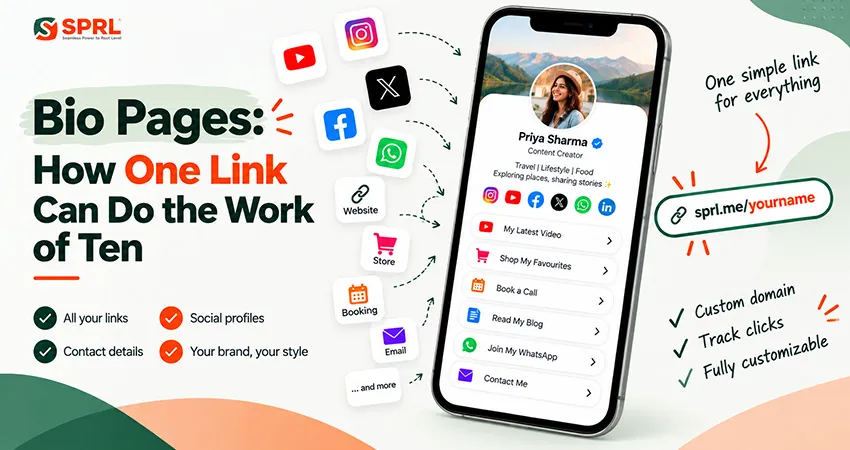
A bio page gives you one link to share everywhere — Instagram, Facebook, LinkedIn, WhatsApp, YouTube and more. Instead of sending people to a single website or profile, you can bring your important links, products, social profiles, contact options and forms together on one branded page.
SPRL Bio Pages lets you create and customize your own link in bio page, with support for custom domains, page views and click tracking.
Your audience only gets one first click
You publish a Reel, a post, a YouTube video, a WhatsApp update or a campaign. Someone likes what they see and opens your profile. Then they look for the next step: the product, the full article, the booking page, the store, the offer or the contact option.
The problem is simple: most social profiles give you very little room to present all of those destinations clearly. You end up changing the link repeatedly, putting several URLs into a messy profile description, or sending people to a homepage and hoping they find what they came for.
A Bio Page solves that problem by turning one profile URL into a focused landing page containing the destinations that matter right now.
The idea is simple: instead of asking your audience to choose where to go before they arrive, give them one clear page where the important choices are already organized.
What is a Bio Page?
A Bio Page is a lightweight personal or business landing page designed around a collection of links and content blocks. You share one URL in your social profile, email signature, QR code, campaign or anywhere else people need to find you.
When visitors open that URL, they see your identity first and then the links, actions and destinations you want them to discover.
The important difference between a Bio Page and a generic homepage is focus. A homepage may have navigation, menus, multiple sections and dozens of possible paths. A Bio Page is deliberately compact: show who you are, then make the next action obvious.
Think of it as your digital front desk
Your Bio Page can become the place where you send people when you do not know exactly which destination they need. A customer can choose the product page. A prospect can choose the contact form. A follower can choose your social profile. Someone scanning a printed QR code can go straight to the current campaign.
Anatomy of a Bio Page that gets clicked
A good Bio Page does not need dozens of blocks. It needs the right hierarchy. Visitors should understand who you are and what they can do within a few seconds.
Clear identity
Your name, brand or organization should be immediately recognizable.
Short introduction
Explain what you do in one useful sentence instead of a long biography.
Primary action
Put the most important destination near the top of the page.
Supporting links
Give visitors useful alternatives without turning the page into a directory.
Consistent branding
Use your visual identity so the page feels like part of your brand.
Focused layout
Remove distractions and make every block earn its place on the page.
Five Bio Page mistakes that cost you clicks
Who gets the most value from a Bio Page?
A Bio Page is useful whenever one person, brand or campaign needs to point an audience toward several destinations.
Creators
Combine your latest video, social profiles, newsletter, store and contact options.
Businesses
Give customers a compact entry point to products, support, website and campaigns.
Marketers
Use one profile destination that can change as campaigns and priorities change.
Agencies
Create a clean destination for a brand, campaign or client-facing profile.
Professionals
Bring your portfolio, LinkedIn, resume, booking and contact links together.
Communities
Put registration, announcements, resources and social channels in one place.
How SPRL Bio Pages works
SPRL Bio Pages is designed around a simple block-based approach. Instead of building a complete website just to publish a handful of important destinations, you create one focused page and arrange the content you want visitors to see.
Create your Bio Page
Start with your profile identity and choose the page address you want to share.
Add your important blocks
Add the links, text and calls to action that make sense for your audience.
Arrange the order
Move your most important action toward the top and supporting destinations below it.
Publish and share one URL
Use the same Bio Page URL in your social profiles, campaigns, QR codes and other channels.
Keep it current
Update the page as your campaigns, offers, products and priorities change.
Set up a useful Bio Page in one sitting
You do not need to fill the page with everything your business has ever published. Start with the destinations your audience is most likely to need today.
- Choose your identity. Use a name people already recognize.
- Write a one-line description. Say what you do and who you help.
- Choose one primary action. This might be your store, booking page, product or latest campaign.
- Add supporting links. Include only destinations that are genuinely useful.
- Review the page on mobile. Check spacing, labels and the order of the links.
- Publish it everywhere. Update your social profiles and other places where people currently find you.
Before you publish
A quick quality check for your Bio Page.
- Someone can understand what you do without scrolling for a long time.
- Your most important action is clearly visible near the top.
- Every link has a specific and understandable label.
- There are no expired campaigns or unnecessary destinations.
- The page still looks good and works correctly on a phone.
- Your branding feels consistent with the rest of your business.
Bio Page best practices
Lead with the destination, not the technology
Visitors do not care that your page is built with a particular tool. They care about what happens after they tap. “Book a demo” is more useful than “Business Link.” “Shop the new collection” is more useful than “Website.”
Use your page as a living campaign surface
Your Bio Page does not have to remain unchanged for months. If a campaign is active today, give it priority today. When the campaign ends, replace it with something that is useful now.
Keep the number of choices under control
More links do not automatically create more clicks. Too many choices can make the page feel like a menu instead of a recommendation. Start with your strongest destinations and remove anything that is no longer earning its place.
Make the page feel like your brand
A Bio Page is often the first destination someone sees after discovering you. Typography, spacing, imagery and colors should feel connected to your website, social presence and other customer touchpoints.
Use one memorable URL everywhere
The real advantage is consistency. Once people know your Bio Page URL, you can use that same destination across social profiles, printed material, QR codes, email signatures and campaign creative.
Frequently asked questions
What is SPRL Bio Pages?
Can I use a Bio Page for a business?
Can I update the page after sharing the URL?
Do I need a full website to use one?
Where can I share my Bio Page?
How many links should I put on my page?
Turn your profile link into a destination.
Give people one simple place to discover your business, content, campaigns and next step — instead of making them search for it.
Create your SPRL Bio Page →